
Free NDIS invoice template for support workers
An editable NDIS invoice template with every field a plan manager needs: your ABN, the participant's NDIS number, and a line for each shift with its support item number, hours and rate. Free, no email, yours to keep.
1 page · A4 · free
Or skip the template. Clio fills it in for you.
A template still means typing every shift, item number and rate by hand. Clio builds the invoice from the shifts you've worked, with the right item and rate for the day, checks it and sends it. Use code INVOICE60 and your free trial is 60 days instead of 30. No card needed.
On your phone? Get the app, then enter INVOICE60 when you sign up.


What every NDIS invoice needs
Plan managers process hundreds of invoices. One that has everything in the expected place gets paid; one that is missing a detail gets queried. The template has a place for each of these.
- Your name or business name, ABN and contact details. The NDIA says an invoice to a plan-managed participant must include a valid ABN, unless you are exempt.
- An invoice number and the date issued. Use a new number every time, and add a due date.
- The participant's name and NDIS number. The plan manager needs both to claim from the right plan.
- Who manages the plan. The plan manager's name and email, or that the participant self-manages.
- A line for each support. The date and times, the support item number, a short description, the hours or quantity, the rate and the line total.
- The total, and GST only if it applies. Most NDIS supports are GST-free.
- Your bank details. Account name, BSB and account number.
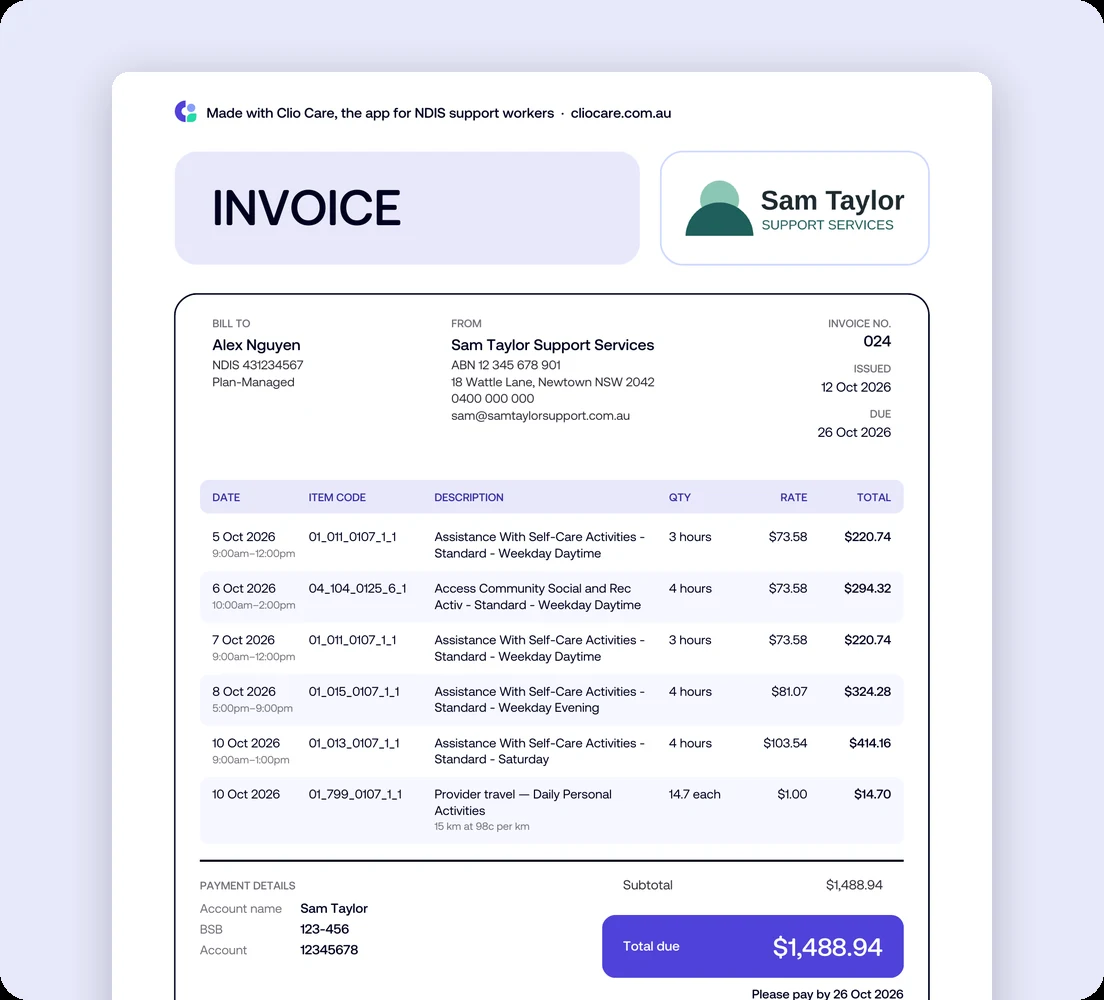
A filled-in example
Five shifts and a travel line for one plan-managed participant. Notice that the Saturday and the evening shift use their own support item numbers and rates.
The mistakes that get invoices queried
- The wrong item for the day. A Saturday shift billed with the weekday daytime item is an under-claim, and the plan manager may query it.
- A rate above the price limit. Plan managers can't pay more than the NDIS price limit for the item.
- A missing ABN or NDIS number. Without them the plan manager can't claim.
- A typo in the plan manager's email. The invoice never arrives, and you only find out weeks later when you haven't been paid.
- Sending it late. From 1 December 2026, supports must be claimed within 90 days.
What a template can't do, and Clio can
A template is only as right as what you type into it. Clio builds the invoice from the shifts you've already worked, checks it, sends it and keeps track of it. More on Clio's NDIS invoicing software.
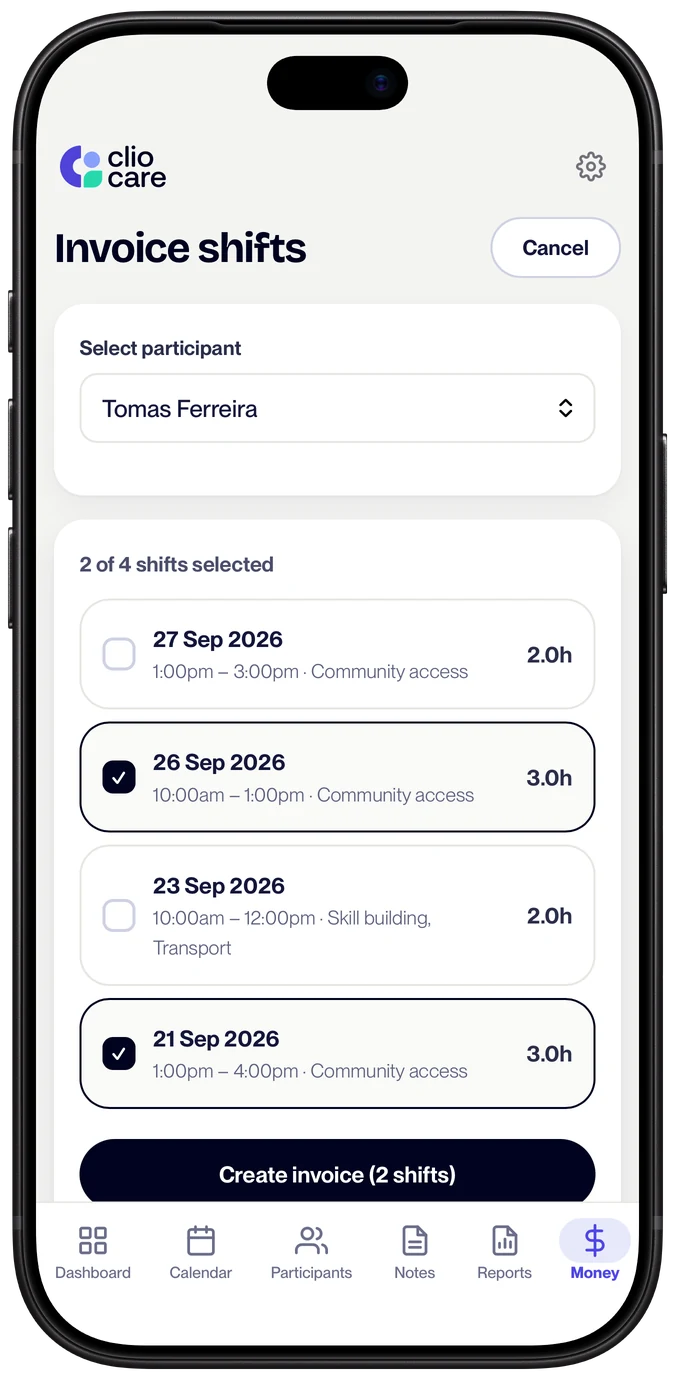
Built from your shifts, right first time
Tick the shifts you haven't invoiced and Clio fills in each line: the date and times, the hours, and the right support item and rate for the day, whether that's a weekday, an evening, a weekend or a public holiday. All 345 support items a worker can bill are built in.
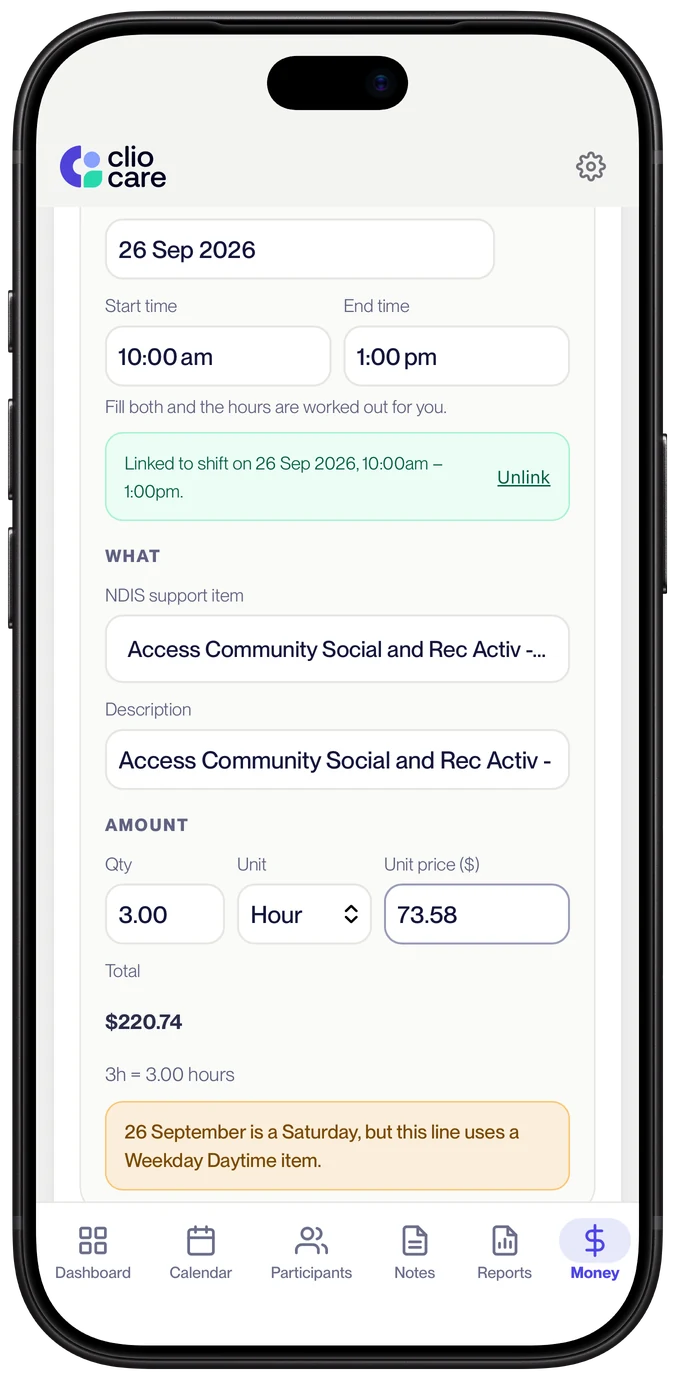
Checked before it goes
Clio flags a line whose item doesn't match the day of the shift, hours that don't match the shift's times, and a travel rate above what the NDIA allows. It won't let you reuse an invoice number. You see each warning and decide.
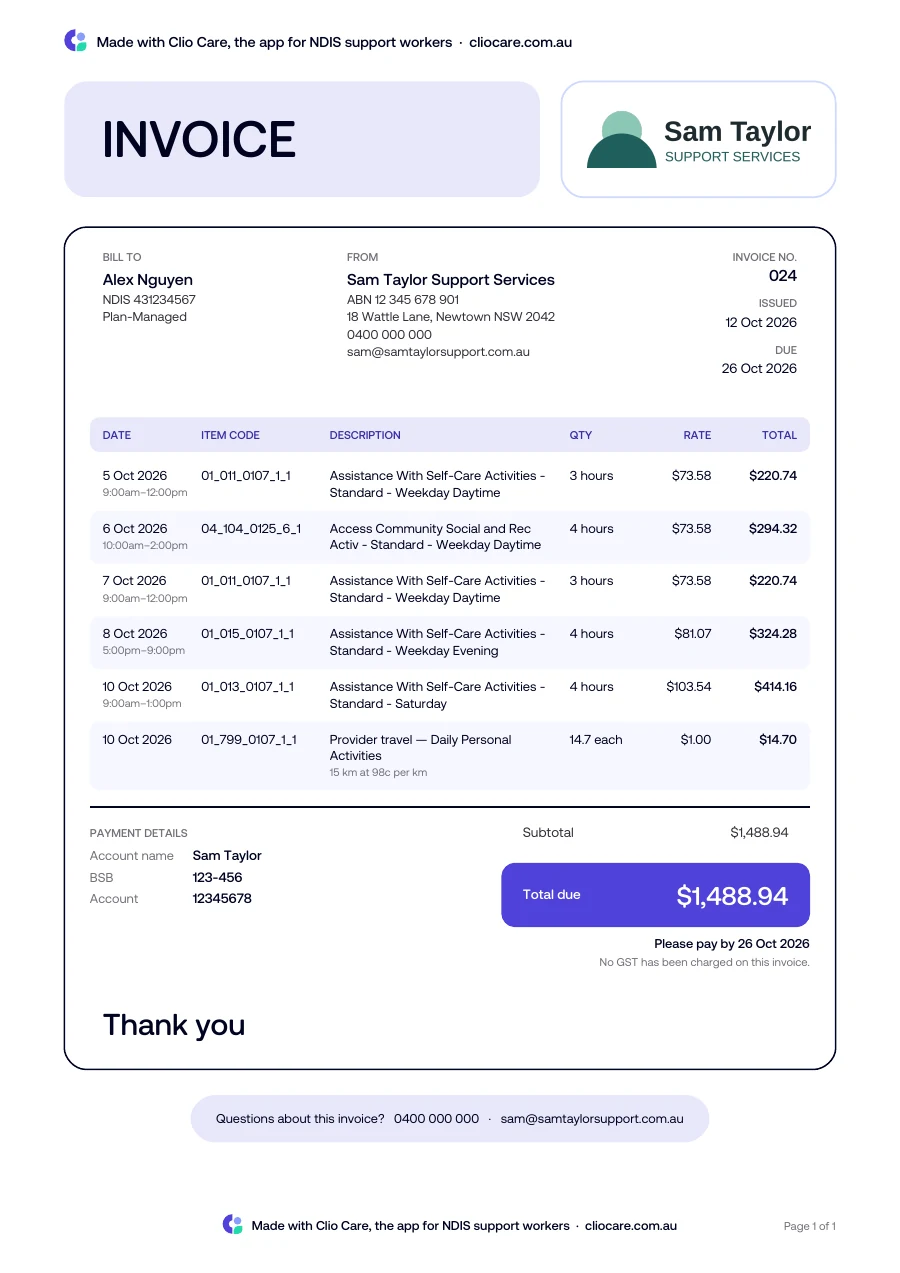
Clean, the same every time, sent from you
Every invoice carries your logo, ABN and bank details in the layout plan managers process. Clio emails it to the plan manager from an address in your name, attaches your notes for those shifts if they want them, and tells you if the email couldn't be delivered.
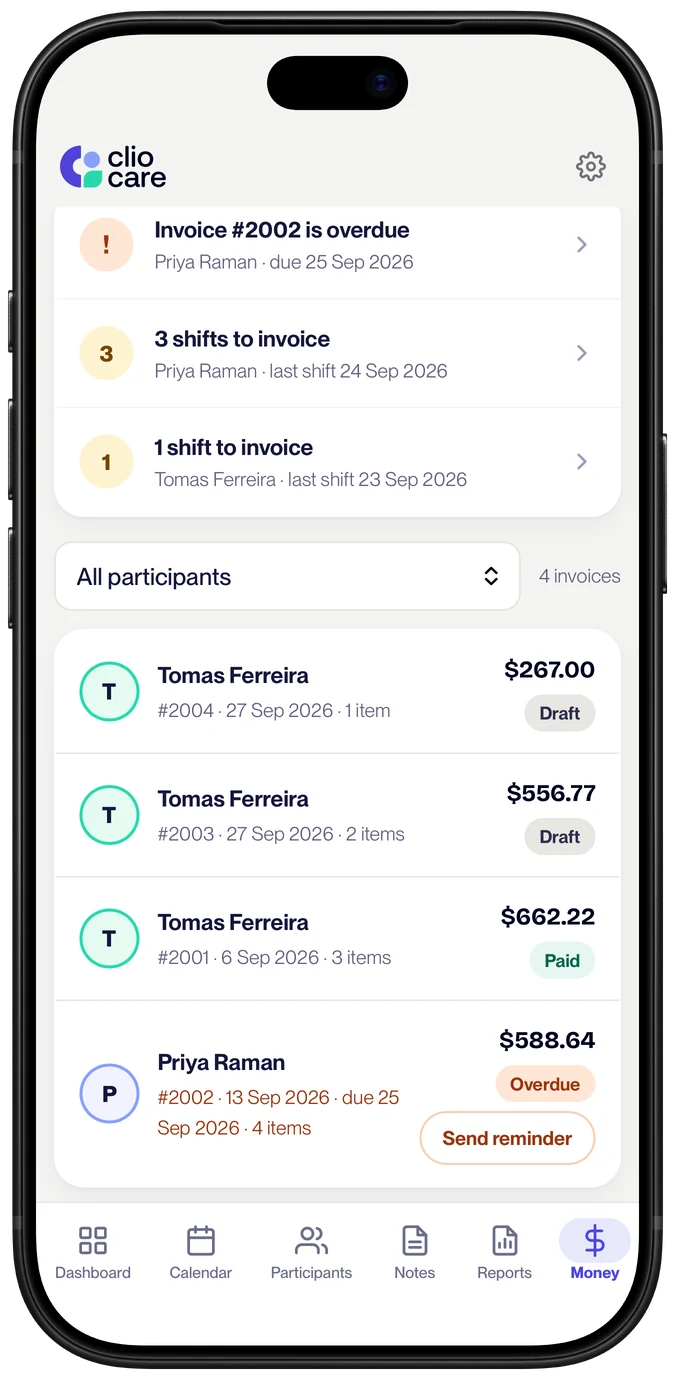
Every invoice kept, and chased politely
See what's draft, sent, paid and overdue. Send a reminder from the invoice in one tap. Every invoice stays with the shifts and notes it came from, so you can find it when someone asks.
NDIS invoices, answered
What should an NDIS invoice include?
Your name or business name, your ABN, your contact details, an invoice number and date, the participant's name and NDIS number, and a line for each support with the date, the support item number, the hours or quantity, the rate and the total. Add your bank details so you get paid, and the plan manager's details if the participant is plan-managed.
Do I need an ABN to invoice the NDIS?
For a plan-managed participant, the NDIA says the invoice must include a valid ABN, unless you are exempt from providing one, in which case you include a Statement by a supplier form from the ATO. Most independent support workers have an ABN as sole traders.
Do I charge GST on NDIS invoices?
Usually not. Most NDIS supports are GST-free when they are reasonable and necessary supports in a participant's plan. If you are not registered for GST, do not add GST at all. If you are registered, check each support with your tax agent or the ATO.
Who do I send the invoice to?
For a plan-managed participant, send it to their plan manager, who pays you from the participant's plan. For a self-managed participant, send it to the participant or their nominee, who pays you and claims from their plan. Workers who are not registered cannot be paid from NDIA-managed plans.
How soon should I send an NDIS invoice?
Soon after the shifts. From 1 December 2026, supports in a participant's plan must be claimed within 90 days, down from 2 years, so an invoice that sits in your drafts for a few months can leave the plan manager unable to claim it.
Which support item number do I use?
The one for the support and the day and time it happened. Standard self-care, for example, has separate item numbers for weekday daytime, evening, night, Saturday, Sunday and public holidays, each with its own price limit. Our NDIS price guide for support workers lists every item you can bill. See the NDIS price guide.
Is this template free?
Yes. The Word and PDF versions are free to download, edit and use, with no email and no sign-up. They stay free whether or not you ever use Clio.
More free templates: NDIS service agreement template, NDIS progress notes template and NDIS consent forms. Setting up on your own? Read how to become an independent NDIS support worker.
Your next invoice, built from your shifts.
The template is yours to keep. When you're ready, Clio puts the right item and rate on every line, checks it, and sends it from you.
Code INVOICE60. No credit card.