
NDIS invoicing software that gets you paid for every hour.
Turn your completed shifts into compliant invoices at the right rate for the day and time, email them to the plan manager with the case notes attached if they want them, and see at a glance who has paid. Built for independent support workers.


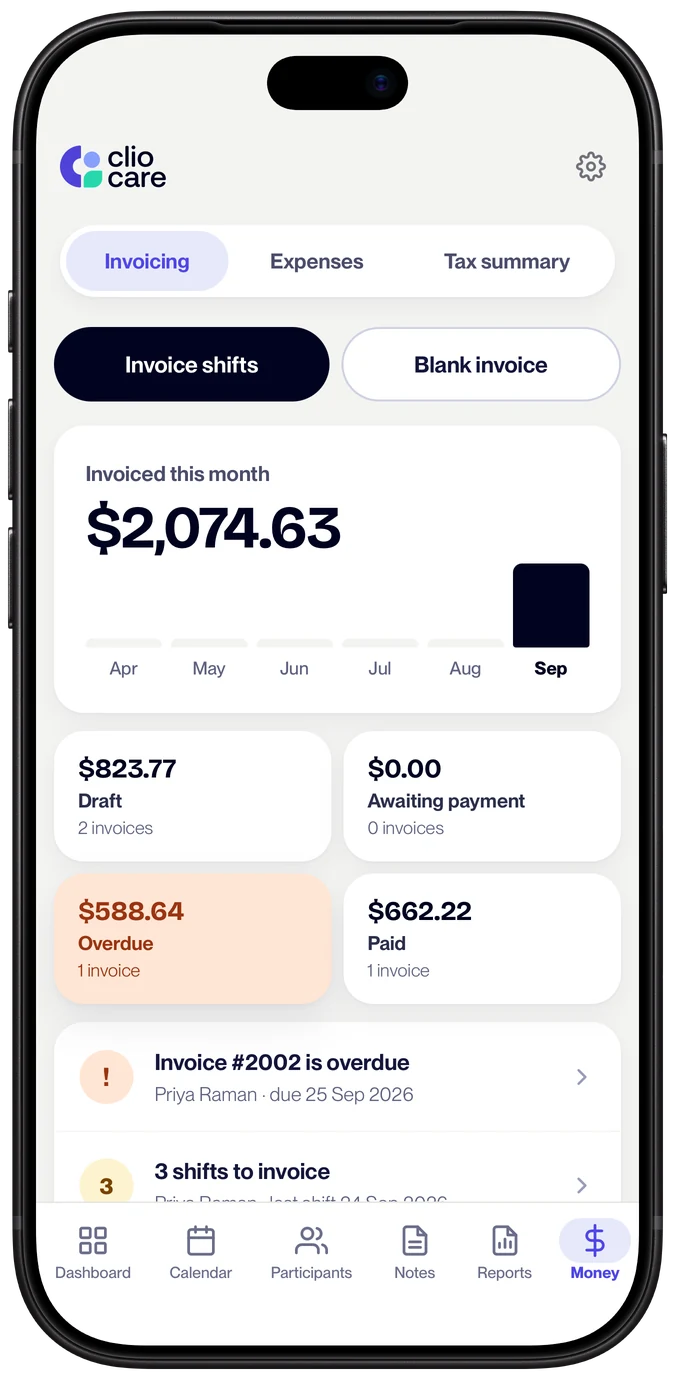
Invoicing shouldn't cost you a Sunday afternoon.
Most independent workers invoice the hard way: copying shift times out of a calendar, looking up support item numbers in the NDIA's spreadsheet, working out whether a shift that ran past 8pm counts as an evening, then emailing a PDF and hoping it gets paid.
Every one of those steps is a chance to lose money. A Saturday shift billed at the weekday rate is a real under-claim, and it happens to careful people. Clio does the looking up and the checking for you.
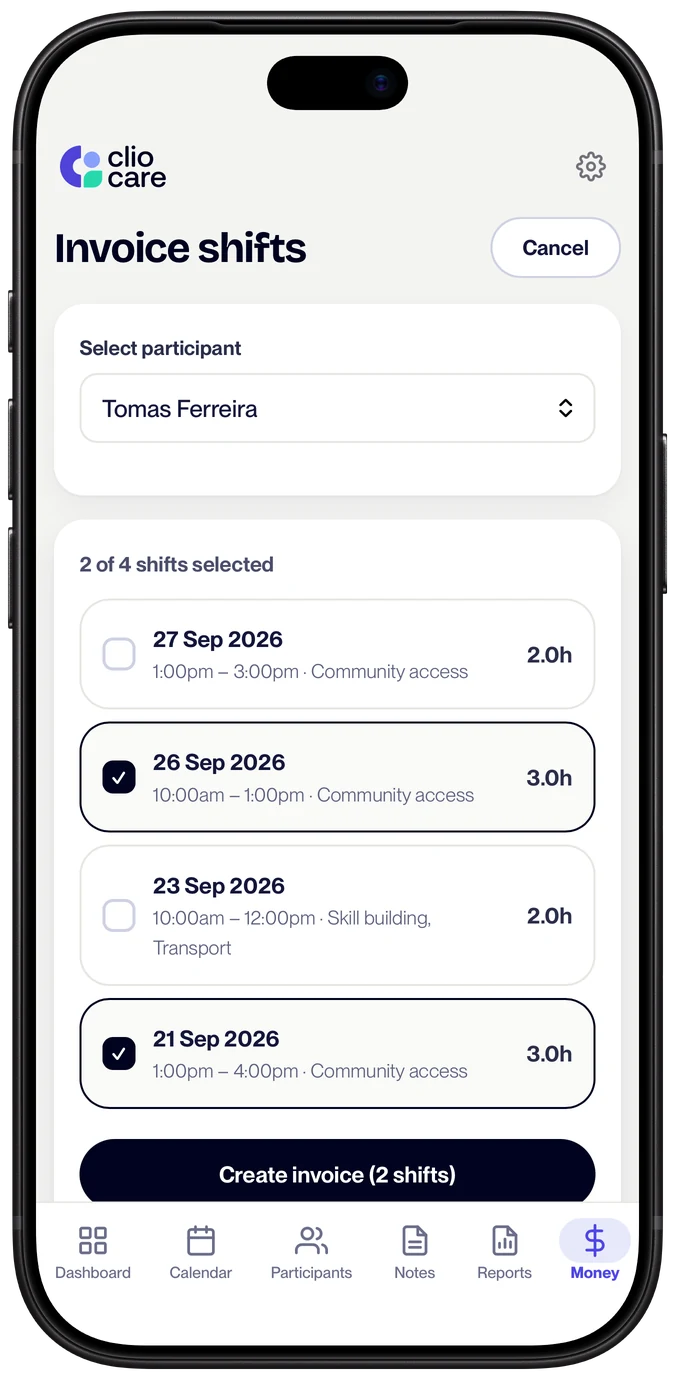
From shifts to an invoice in a couple of taps.
Invoice shifts. Pick the completed shifts you haven't invoiced yet and Clio Care builds the invoice, one line per shift, with the date, times, hours, support item and rate filled in.
- Your details, set once. Business name, ABN, address and bank details appear on every invoice, and the due date fills in from your payment terms.
- Saved line items. Keep the support items you use most, then tap one to fill in a line.
- Regular clients. Duplicate last fortnight's invoice and update the dates.
- Work that wasn't a shift. Start a blank invoice. Clio still offers to link each line to a matching shift on that date.
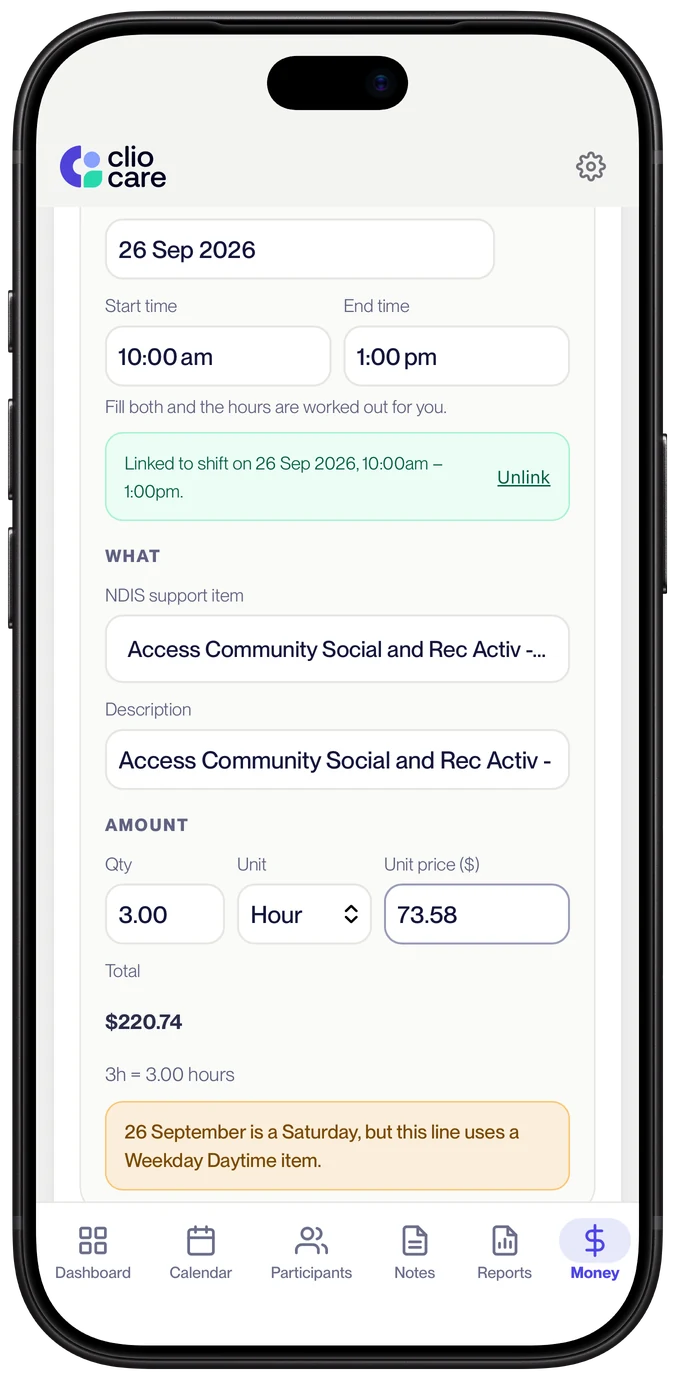
Clio checks every invoice before you send it.
Smart checks, built in. Clio Care knows the NDIS billing rules for days, times and rates, so it catches the slips that cost support workers money before a plan manager ever sees them.
- The right rate, picked for you. Set a participant's support item once. Each shift is billed at its weekday, evening, night, Saturday or Sunday version, using the NDIA's own time-of-day rules and your saved rate.
- Wrong day? Flagged. A Saturday shift on a weekday rate is caught before you send. It's the under-claim careful workers still make.
- Hours that don't add up. Clio works out the hours from the start and end times, and tells you if the hours billed don't match. Past 8pm, it offers the evening rate.
- Travel worked out. Enter the kilometres and your rate and Clio does the maths. It tells you if the rate is above what the NDIA considers reasonable.
- The 2026-27 price guide, built in. All 345 support items a support worker can bill, with their NDIS codes. Search by name and the price limit fills in. Quoted supports and items with no published price are marked, so you know when to enter your own.
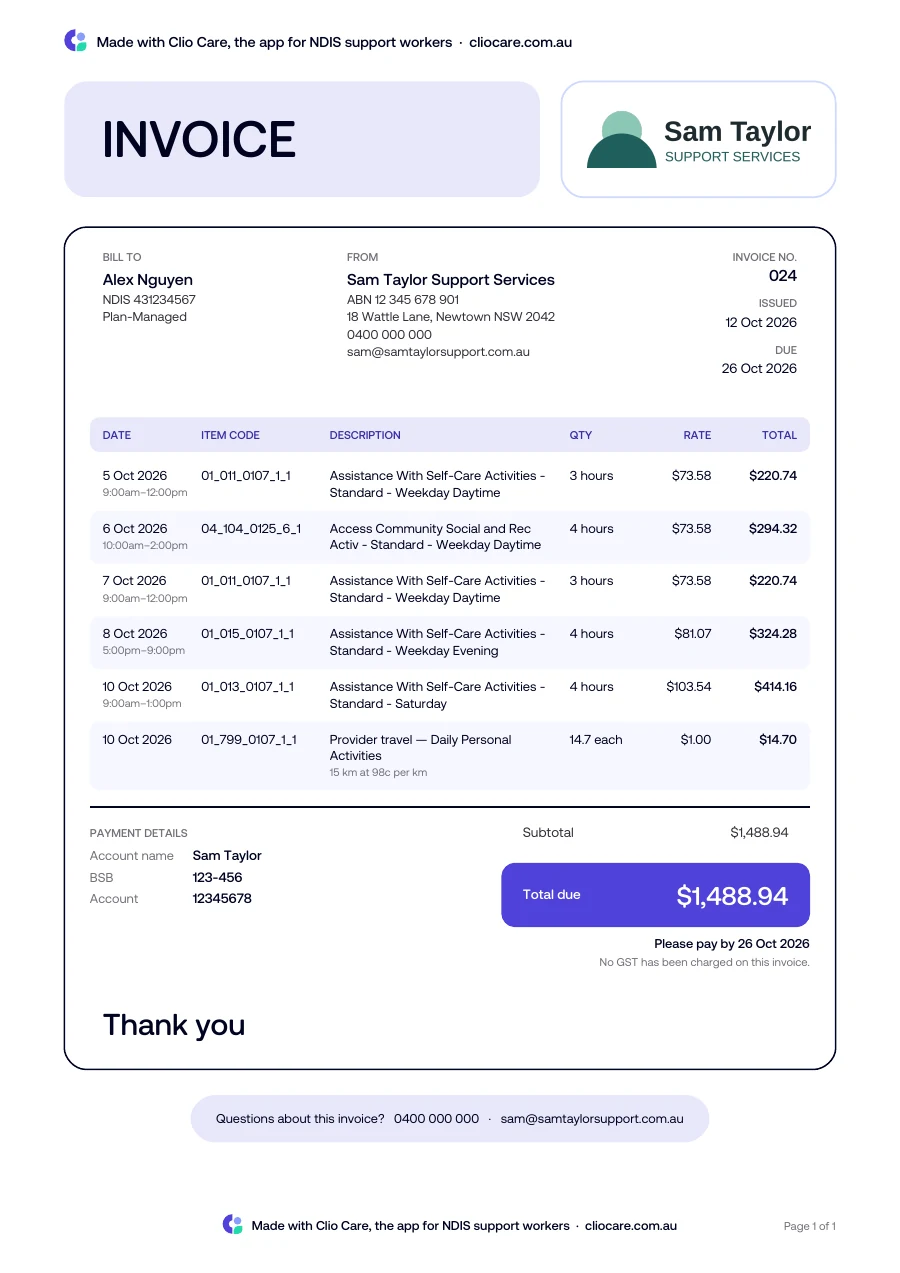
Everything a plan manager needs, first time.
Compliant invoices, ready to send. Every invoice is a clean PDF with the NDIS support item number and description on every line, the participant's NDIS number, your ABN, the service dates and times, and a clear total due.
- Your logo on every invoice. Add it once in Settings. It sits at the top of each invoice and the email it's sent in.
- Email it from Clio Care. Save the plan manager's email on the participant's profile once, then send with the PDF attached. Replies come straight to you.
- Attach the case notes. If the plan manager asks for them, tick a box and Clio attaches the signed notes for the invoiced shifts, each as its own PDF.
- Your numbering. Keep your own invoice numbers. Clio stops you reusing one by mistake.
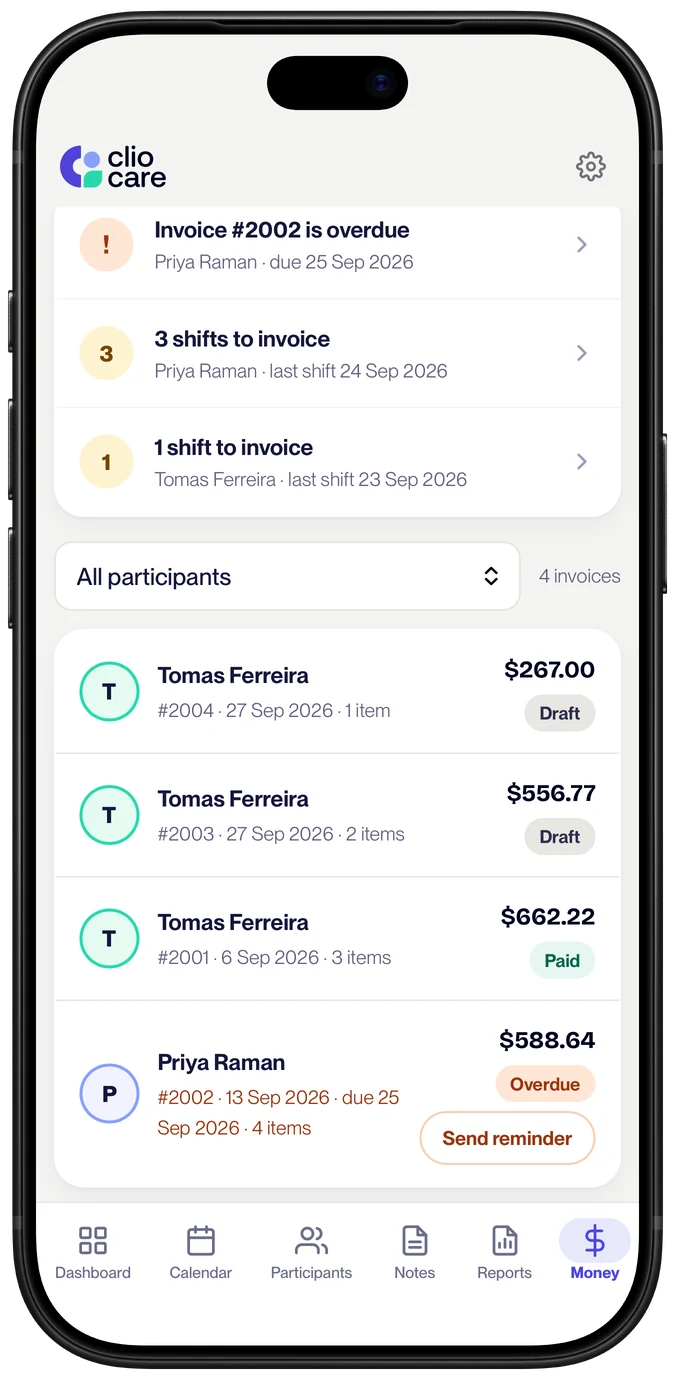
Know who has paid, and chase who hasn't, politely.
Payment tracking and reminders. See every invoice by stage: draft, awaiting payment, paid and overdue. Tap a stage to see just those invoices.
- Reminders without the awkward email. Write a friendly opening and closing once. Clio Care adds the invoice number, amount and due date every time, and attaches the invoice again.
- Bounced emails caught. If an invoice email can't be delivered, Clio tells you, so a misspelt address never leaves you waiting on money nobody was asked for.
- Paid or unpaid. Mark an invoice paid, or back to unpaid, and edit it even after it's sent.
- Expenses and tax, next door. Snap receipts in the same Money tab and download a tax summary at the end of the financial year.
Every NDIS support item number, built in.
Clio's support items come from the official NDIS Support Catalogue 2026-27 and are updated when the NDIA publishes new pricing each year. Price limits are maximums: you can always charge less, and every rate stays editable.
See every rate in our free NDIS price guideNDIS invoicing, answered.
What should NDIS invoicing or billing software do for a support worker?
Four things: build invoices from the shifts you've worked, with the right NDIS support item and price for the day and time; check them before they go; email them to the plan manager; and track what's been paid. Clio Care does all four, and it's built for independent support workers rather than providers, so you don't pay for team rostering or provider billing you'll never use.
Are these NDIS-compliant invoices?
Yes. Every invoice carries the NDIS support code, the participant's NDIS number, your ABN, the service date, and the line-item breakdown plan managers need. PDFs render the same way every time so plan managers can process them quickly.
Can I put my logo on my invoices?
Yes. Add your business logo in Settings, under Business details. It appears at the top of every invoice and in the email the invoice is sent in, sized to fit without stretching. PNG, JPG or WebP files work.
Can I email plan managers from inside Clio Care?
Yes. Save the plan manager's email on the participant's profile once, then send invoices to them in one tap. The PDF goes as an attachment and the invoice gets a "sent" status.
Does Clio Care pick the right rate for weekends and evenings?
Yes. Set a participant's support item once and Clio Care bills each shift at its weekday, evening, night, Saturday or Sunday version, using the NDIA's time-of-day rules and your saved rate. If a line's rate doesn't match the day, Clio flags it before you send, with a one-tap fix.
What does Clio Care check before I send an invoice?
Clio Care checks that each line's support item matches the day of the shift (a Saturday shift on a weekday rate is flagged), that the hours billed match the shift's start and end times, and that a travel rate isn't above what the NDIA considers reasonable. It won't let you reuse an invoice number. After you send, it tells you if the email couldn't be delivered. Apart from the invoice number, every check is a heads-up: you see it and decide.
Do you support all the NDIS support codes?
Clio Care includes the 345 support items a support worker can bill from the NDIS Support Catalogue 2026-27, covering self-care, community access, household tasks, nursing, therapy, behaviour support, supported independent living and early childhood. Every code and price comes from the official catalogue. If you need something outside that, you can still add it manually on the invoice line.
What if I already have an invoice numbering scheme?
You can edit the invoice number on every invoice. If your bookkeeper has been numbering invoices for years (or your accounting software has its own scheme), Clio Care doesn't force you to start from #1.
Do I charge GST on NDIS invoices?
Most supports delivered to an NDIS participant under their plan are GST-free, so many sole trader support workers never charge GST. Registering for GST is generally only required once your turnover passes the ATO threshold. This is general information rather than tax advice, so confirm your own situation with your accountant.
Who do I send an NDIS invoice to?
It depends how the participant's plan is managed. If they are plan-managed you invoice their plan manager. If they are self-managed you invoice the participant or their nominee directly. NDIA-managed supports can only be paid to registered providers, so most sole traders will not invoice for those.
Is Clio Care better than an NDIS invoice template?
A template means typing the same shift details twice, once in your notes and once in the invoice. Clio Care builds the invoice from shifts you have already scheduled, carries the support item numbers, and tracks whether each invoice has been paid, so nothing gets invoiced twice or missed.
Can I put several shifts on one invoice?
Yes. Invoice a single shift on its own, or batch a fortnight of shifts for the same participant into one invoice. Each shift becomes its own line with its date, support item number, hours and rate.
Can I send case notes with the invoice?
When you send an invoice built from shifts, Clio Care finds the case notes for those shifts and offers to attach them as PDFs in the same email. It is a tick box, so leave it off for recipients who do not want them.
Can I invoice for work that wasn't on the calendar?
Yes. Start a new invoice and write line items from scratch. Clio Care still looks for a shift on that date for each line. If it finds one, you can link it with one tap. If not, it's saved as separate work.
Can Clio Care chase late payments?
Yes. Send a payment reminder from the invoice. Write a friendly opening and closing once and Clio Care reuses them, adding the invoice number, amount and due date each time and attaching the invoice again.
Get paid for every hour you work.
Try Clio Care free for 30 days, then $15 a month for 1 participant or $29 a month for unlimited participants, with every feature in both. No card to start, cancel anytime.